Hello, where I could find the guide on how to install an IDE and debug the code?
-
LucaPaterlini commented at 8:36 PM on July 17, 2018: none
-
MarcoFalke commented at 9:12 PM on July 17, 2018: member
Sorry, we don't have documentation on how to use common IDEs with our build configuration, because for integration the IDEs often require
cmake. However, it is possible to use any IDE (likeclionorvim) to edit the code.Some further resources, that talk about specific IDEs:
- https://bitcoin.stackexchange.com/questions/56529/what-ide-to-use-for-bitcoin-development
- Visual Studio build configuration for Bitcoin Core. #11526 (unmerged)
- https://bitcoin.stackexchange.com/questions/50046/how-to-open-bitcoin-source-in-ide
- MarcoFalke added the label Questions and Help on Jul 17, 2018
- MarcoFalke added the label Build system on Jul 17, 2018
-
LucaPaterlini commented at 10:58 PM on July 17, 2018: none
so far I am not happy with this answer, because this means that clion is not available for debug mode and step by step inspection, the only viable option from what you have suggested looks like the visual studio option. Does this mean that the codebase has never been tested step by step with a debugger?
-
sipa commented at 11:09 PM on July 17, 2018: member
@LucaPaterlini Most developers don't use IDEs as far as I know, but that doesn't prevent editing and debugging.
-
LucaPaterlini commented at 11:12 PM on July 17, 2018: none
why there is not a paragraph or a tutorial on how to debug and make the life easy for the new contrbutors?
-
MarcoFalke commented at 11:39 PM on July 17, 2018: member
clion is not available for debug mode and step by step inspection
I do believe this is possible. I did this a few years ago, so no guarantee on correctness or completeness:
- Build the executable "normally" in the terminal (
./autogen.sh && ./configure && make -j 2) - Open the source tree in clion and add a "run configuration" to clion, selecting the executable manually and specifying the command line args. Something like this:

- Set a debug point in one of the source files and debug the configuration target you just created...
See for example:
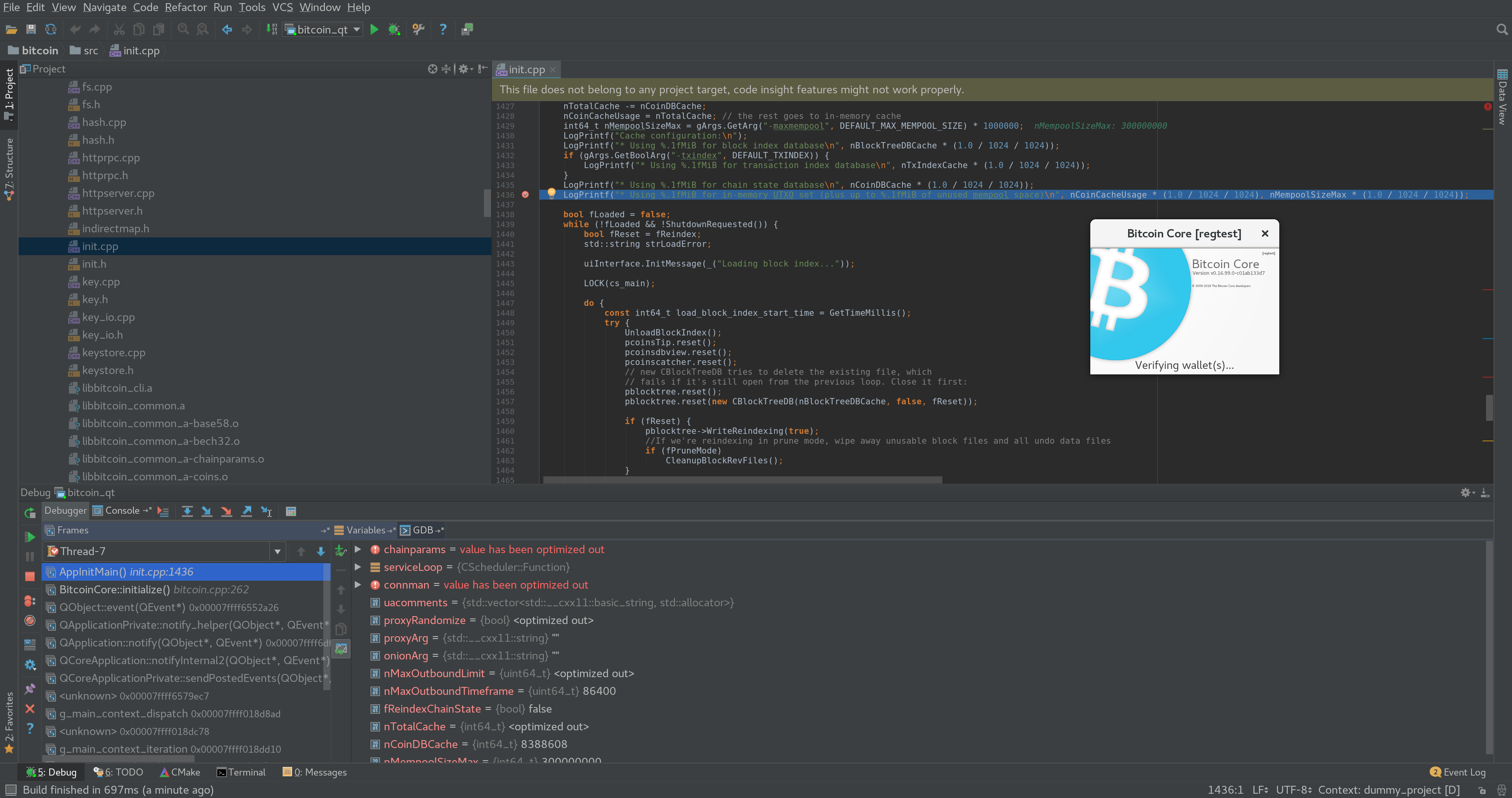
- Build the executable "normally" in the terminal (
- laanwj renamed this:
Bitcoin core development
Bitcoin core development in IDE
on Jul 18, 2018 -
crowdcoinChain commented at 9:24 AM on July 18, 2018: none
hi, I have a newer version 2018.1, could you explain what datadir param stand for?
I have tried the way you suggested and I got
Error running 'bitcoind' Cannot run 'bitcoind' on '<default>'
-
jonasschnelli commented at 8:05 AM on July 19, 2018: contributor
If one wants line by line debugging,
gdborlldbis probably the most simplest way to do this. Just use./configure --enable-debugand rungdb src/bitcoind.Using Qt Creator's IDE is also an effective how to do line-by-line debugging (more GUIish then gdb) including interactive variable inspection, etc.
-
MarcoFalke commented at 11:17 AM on July 19, 2018: member
If someone wants to add documentation on how to setup an IDE with Bitcoin Core please do so at https://github.com/bitcoin-core/docs
- MarcoFalke closed this on Jul 19, 2018
-
sipsorcery commented at 12:13 PM on July 25, 2018: member
If someone wants to add documentation on how to setup an IDE with Bitcoin Core please do so
For Windows devs:
Install Visual Studio Community Edition (free), Double click build_msvc/bitcoin.sln from #11526 ;).
-
toknT commented at 5:56 AM on November 26, 2019: none
I am using wsl and vscode to debug set .launch.json like this
{ // Use IntelliSense to learn about possible attributes. // Hover to view descriptions of existing attributes. // For more information, visit: https://go.microsoft.com/fwlink/?linkid=830387 "version": "0.2.0", "configurations": [ { "name": "(gdb) Launch", "type": "cppdbg", "request": "launch", "program": "${workspaceFolder}/src/bitcoind", "args": [], "stopAtEntry": false, "cwd": "${workspaceFolder}", "environment": [], "externalConsole": false, "MIMode": "gdb", "setupCommands": [ { "description": "Enable pretty-printing for gdb", "text": "-enable-pretty-printing", "ignoreFailures": true } ] } ] } - whb07 cross-referenced this on Aug 10, 2020 from issue Decouple build system from source. Use CMake to help newcomers and ecosystem! by whb07
- bitcoin locked this on Dec 16, 2021