how to connect multiple nodes in a private chain on only one pc in RegTest ? #22723

issue jiebanghan opened this issue on August 17, 2021
  1. jiebanghan commented at 8:48 AM on August 17, 2021: none

    Hello, I hava only one pc and I make the bitcoin in wsl on my pc. I just want to create multiple bitcoin nodes in my pc. I have read this but failed too. So would you please tell me how to solve it? thank you.

    I am so sorry maybe I mislead you above . Actually, my aim is to create a private chain with multiple bitcoin nodes which can connect themselves in WSL on my only one PC. When one of these nodes mine a block and this guy can broadcast it to other nodes then other nodes begin to try to mine next block on my PC and this is my aim. By the way, the WSL is Windows Subsystem for Linux. Hence, would you please tell me how to solve it? thank you.

  2. jiebanghan added the label Feature on Aug 17, 2021
  3. fanquake removed the label Feature on Aug 17, 2021
  4. i5hi commented at 10:24 AM on August 17, 2021: none

    Can you provide some more detail on the configs you are using for each?

  5. i5hi commented at 10:27 AM on August 17, 2021: none

    And logs.

  6. i5hi commented at 10:36 AM on August 17, 2021: none

    Also, have you tried bitcoin-multi-node referenced in the stack exchange thread?

  7. ghost commented at 12:33 PM on August 17, 2021: none

    Hello, I hava only one pc and I make the bitcoin in wsl on my pc.

    I am assuming you are trying to run multiple nodes on Windows

    I just want to create multiple bitcoin nodes in my pc. I have read this but failed too. So would you please tell me how to solve it? thank you.

    Follow the below steps:

    1. Create two directories (Node1 and Node2) and bitcoin.conf files in D: and E:

      D:\Node1\bitcoin.conf

      
      regtest.rpcport=18222
      rpcuser=user1
      rpcpassword=password1
      

      E:\Node2\bitcoin.conf

      
      regtest.rpcport=18666
      rpcuser=user2
      rpcpassword=password2
      
    2. Once you run make install DESTDIR=/mnt/c/workspace/bitcoin mentioned in doc/build-windows.md, it will save the binaries in C:\workspace\bitcoin\bin\

    3. Open 2 PowerShell sessions and run the below commands:

      cd "C:\workspace\bitcoin\bin\"
      .\bitcoind.exe -regtest=1 -port=18333 -rpcport=18222 -datadir="D:\Node1\" -conf="D:\Node1\bitcoin.conf"
      
      cd "C:\workspace\bitcoin\bin\"
      .\bitcoind.exe -regtest=1 -port=18777 -rpcport=18666 -datadir="E:\Node2\" -conf="E:\Node2\bitcoin.conf"
      
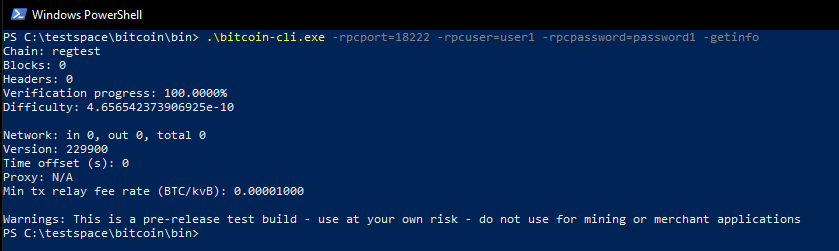
    4. Open a third PowerShell session and you can use bitcoin-cli to run any RPC for Node 1 & Node 2:

    image

  8. jiebanghan commented at 3:13 AM on August 18, 2021: none

    I am so sorry maybe I mislead you above . Actually, my aim is to create a private chain with multiple bitcoin nodes which can connect themselves in WSL on my only one PC. When one of these nodes mine a block and this guy can broadcast it to other nodes then other nodes begin to try to mine next block on my PC and this is my aim. By the way, the WSL is Windows Subsystem for Linux. Hence, would you please tell me how to solve it? thank you.
  9. jiebanghan renamed this:
    how to connect multiple nodes on only one pc in RegTest ?
    how to connect multiple nodes in a private chain on only one pc in RegTest ?
    on Aug 18, 2021
  10. MarcoFalke commented at 5:15 AM on August 18, 2021: member

    You can use -connect=localhost:18666 (with the correct port of the running node) to connect the nodes. I presume that the addnode RPC would also work. Finally, you can look into the functional test, which also setup nodes and connect them.

  11. jiebanghan closed this on Aug 20, 2021

  12. DrahtBot locked this on Aug 20, 2022

github-metadata-mirror

This is a metadata mirror of the GitHub repository bitcoin/bitcoin. This site is not affiliated with GitHub. Content is generated from a GitHub metadata backup.
generated: 2026-04-26 06:14 UTC

This site is hosted by @0xB10C
More mirrored repositories can be found on mirror.b10c.me