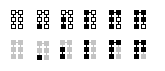
Transaction confirmation counter "clock" symbol does not visualize proportional
- I would expect the clock/progress meter not to show zero, when there is 1 confirmation, but to show/visualize more than zero (I would expect to see a progress of 1/6 <=> 10/60 "mins")
- with "min" here, I do not mean real time minutes, but shares of 60 "min" on a clock (full circle).
Expected behaviour
When less than six, the transaction confirmation counter "clock" symbol should show the proportional share of 60 min: 0 confirmations: Question sign 1 confirmation: Clock "10 min" past 2 confirmations: Clock "20 min" past 4 confirmations: Clock "40 min" past 5 confirmations: Clock "50 min" past 6 confirmations: Check sign
Actual behaviour what clock symbol shows:
0 confirmations: Question sign 1 confirmation: Empty (white) clock, with a black line showing north (I would interpret that normally as zero, like on a analog speed meter) 2 confirmations: Clock "15 min" past (quarter of the clock black) 3 confirmations: Clock "30 min" past (that is correct) 4 confirmations: Clock "45 min" past, see screenshot 5 confirmations: Clock "60 min" past 6 confirmations: Check sign
Screenshots
Here a screenshot of the clock symbol for a transaction that got 4 confirmations
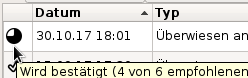
Version 0.15.0.1
Some additional words
I admit, that this is really a nit, nevertheless maybe someone thinks, that this could be improved, too (and has capacity to do that). I know, contributors have really more significant work to do, and I appreciate Your work very much!
Edit: Tried to make my (really trivial?) point more clear, hopefully





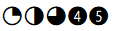 what if we were to make confirmations 1-5 look like the above picture instead? So 4 and 5 being a full back circle but with a number in it to represent the confirmation number.
They are all under "Segoe UI Symbol" Font.
what if we were to make confirmations 1-5 look like the above picture instead? So 4 and 5 being a full back circle but with a number in it to represent the confirmation number.
They are all under "Segoe UI Symbol" Font.
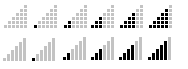 If we should stay away from clock-type icons. What about using something like a signal strength icon with 6 bars. Could also separate those bars into blocks so it looks like your stacking blocks. Like the above picture