<!-- This issue tracker is only for technical issues related to Bitcoin Core. General bitcoin questions and/or support requests are best directed to the Bitcoin StackExchange at https://bitcoin.stackexchange.com. For reporting security issues, please read instructions at https://bitcoincore.org/en/contact/. If the node is "stuck" during sync or giving "block checksum mismatch" errors, please ensure your hardware is stable by running memtest and observe CPU temperature with a load-test tool such as linpack before creating an issue! -->
<!-- Describe the issue -->
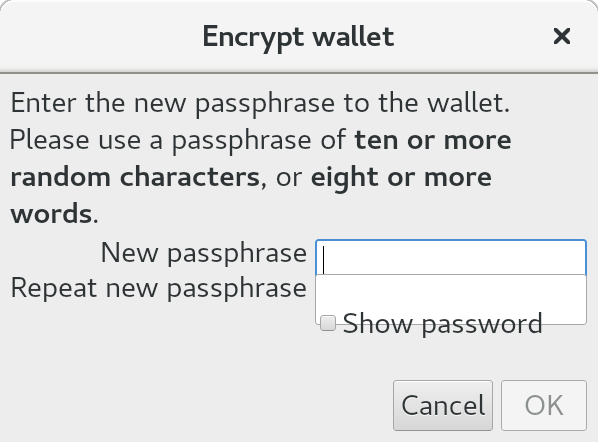
When running bitcoin-core on a computer with a high resolution 4k screen, the app opens in a very, very tiny window (about the size of a postage stamp). I'm running on Redhat Fedora GNU/Linux v27. All my other programs including web browsers and native GNOME apps scale properly based on the screen resolution but bitcoin-core does not, so it appears there's a scaling bug of some sort in bitcoin-core's GUI code rather than something wrong with my desktop (but I could be wrong - I'm happy to investigate further if you think this is a problem on my end).
<!--- What behavior did you expect? -->
The app is tiny and very difficult to read without a magnifying glass. Dialogs with entry fields are too small to contain the text that needs to be entered in them. Some dialogs are too small to contain any visible text. Dragging the window bigger unwraps tangled text but the fonts remain microscopically tiny and hard to see.
<!--- What was the actual behavior (provide screenshots if the issue is GUI-related)? -->
GUI window is too small to easily use. I'll attach a screenshot if I can figure out how.
<!--- How reliably can you reproduce the issue, what are the steps to do so? -->
Install bitcoin-core on typical laptop or desktop with 4k screen, start it.
<!-- What version of Bitcoin Core are you using, where did you get it (website, self-compiled, etc)? -->
v0.15.1.0-g7b5bc998f3 (64-bit) from ringingliberty.com repo
<!-- What type of machine are you observing the error on (OS/CPU and disk type)? -->
Dell XPS 15 9650, Intel Core i7, 4k screen running Redhat Fedora GNU/Linux v27
<!-- Any extra information that might be useful in the debugging process. -->
In some cases, dragging the windows bigger helps by exposing text which is hidden due to wrapping or going off screen but I don't see any obvious way to scale everything up to human readable size and, in some cases, lines of text overlap each other even if I drag the window bigger.
<!--- This is normally the contents of a `debug.log` or `config.log` file. Raw text or a link to a pastebin type site are preferred. -->