This change takes better advantage of the default "Expanding" policy of the form.
New behavior:
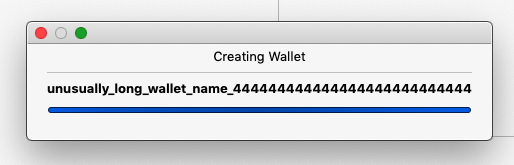
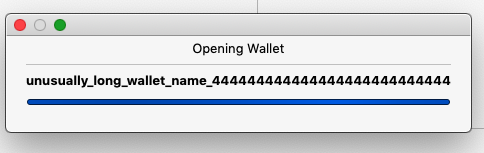
Old behavior:
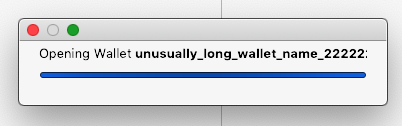

This change takes better advantage of the default "Expanding" policy of the form.
New behavior:
Old behavior:
 205 | @@ -206,7 +206,7 @@ void CreateWalletActivity::askPassphrase()
 206 |
 207 |  void CreateWalletActivity::createWallet()
 208 |  {
 209 | -    showProgressDialog(tr("Creating Wallet <b>%1</b>...").arg(m_create_wallet_dialog->walletName().toHtmlEscaped()));
 210 | +    showProgressDialog(tr("<div align='center'>Creating Wallet</div><hr><wbr /><div align='center'><b>%1</b></div>").arg(m_create_wallet_dialog->walletName().toHtmlEscaped()));

Why mixing HTML-style <hr> with XHTML-style <wbr /> in the same line?
Removing the breaks altogether - looks like the subview will handle it anyway. Good call!
I'm talking about <hr> vs <hr /> and <wbr> vs <wbr />.
Thanks for the feedback! 👍

Concept ACK improving UX w.r.t. long wallet names.
Before seeing an "Opening Wallet" progress dialog, a user enters the long wallet name in the "Create Wallet" dialog. Should the latter be improved in a similar way?
 286 | @@ -287,7 +287,7 @@ void OpenWalletActivity::open(const std::string& path)
 287 |  {
 288 |      QString name = path.empty() ? QString("["+tr("default wallet")+"]") : QString::fromStdString(path);
 289 |
 290 | -    showProgressDialog(tr("Opening Wallet <b>%1</b>...").arg(name.toHtmlEscaped()));
 291 | +    showProgressDialog(tr("<div align='center'>Opening Wallet</div><hr><div align='center'><b>%1</b></div>").arg(name.toHtmlEscaped()));
Duplicated code could be moved into the showProgressDialog() body, no?

html code should not be translated
We can change the title of the view - this allows for more space in the label field for the wallet name.
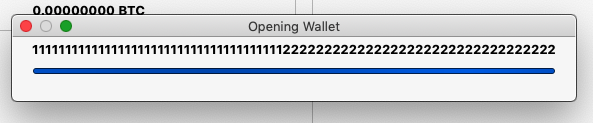
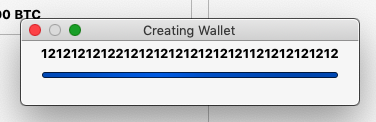
On a UX side note (IMO) the ellipsis should be taken out of the field. If the text field is showing the entire wallet name then the ellipsis is incorrect because it suggests that some of the text has been obfuscated.
As you can see - an ellipsis is added automatically when appropriate.

 206 | @@ -206,7 +207,7 @@ void CreateWalletActivity::askPassphrase()
 207 |
 208 |  void CreateWalletActivity::createWallet()
 209 |  {
 210 | -    showProgressDialog(tr("Creating Wallet <b>%1</b>...").arg(m_create_wallet_dialog->walletName().toHtmlEscaped()));
 211 | +    showProgressDialog(tr("Creating Wallet"), tr("<b>%1</b>").arg(m_create_wallet_dialog->walletName().toHtmlEscaped()));
A make clean fixed the original UI issue on my end.
I will remove the bold brackets from the commit.
Before the next push
I am going to take another look at the progress bar issue for Mac. I suspect the progress bar isn’t inheriting the size hinting and/or the vertical/horizontal expand flag by default - as it is on Linux.

Shouldn't really be translating the Wallet Name either right?

I will remove the bold brackets from the commit.
Just append these at before and after the translated string
In the OP this screenshot
Old behavior:
shows a bug in the GUI. We saw a similar bug before (#15016). If this PR is intended to fix it (I believe so), it would be nice to find out its cause before proceeding (https://github.com/bitcoin/bitcoin/pull/17978#issuecomment-577134568). If it happens that is a macOS-specific bug, macOS users should be also asked to review this PR.
Isn't it possible to dynamically adjust the frame size according to the wallet name? (Like QWidget::adjustSize())
Including a functioning progressBar.

 174 | +    m_progress_dialog->setRange(0, 100);
 175 | +    m_progress_dialog->setWindowTitle(title_text);
 176 |      m_progress_dialog->setCancelButton(nullptr);
 177 |      m_progress_dialog->setWindowModality(Qt::ApplicationModal);
 178 | +
 179 | +    for ( int i = 1, inc = 1000; i < 60000; ++inc, i += inc )
NACK: this loop knows nothing about actual progress of the wallet controller activity.

NACK :tada:
 169 |  {
 170 |      m_progress_dialog = new QProgressDialog(m_parent_widget);
 171 | -
 172 |      m_progress_dialog->setLabelText(label_text);
 173 | -    m_progress_dialog->setRange(0, 0);
 174 | +    m_progress_dialog->setRange(0, 100);
What's wrong with a busy indicator (https://doc.qt.io/qt-5/qprogressbar.html#details)?
I am glad you said something - this make sense now.
On linux the busy indicator has height and contrast. it actually conveys to the user that something is happening.
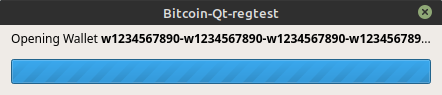
On macOS the busy indicator is thin and the colors do not have enough contrast - unless you really look at it the user may not even see that anything is happening.

I scoured the documentation trying to find a height adjustment for the progressBar. There doesn't appear to be one (that is simple to implement).
As you can see - the presentations are very different between Linux and Mac.
Short of writing a custom progressDialogue/Bar - maybe an adjustment to the colors that the progress bar is using will fix the issue.
Maybe selecting a styling that has better contrast across platforms would be better.
Thanks for saving me the time...and thanks for the free lesson on cross platform frameworks.
The height and weight adjustment probably depends on the window manager, not on Qt.
Maybe you can try, like I said above, add a QWidget::adjustSize() to adjust the size manually. If you don't know how, I think it you could add m_progress_dialog->adjustSize() on line 175 in walletcontroller.cpp
Maybe selecting a styling that has better contrast across platforms would be better.
It could help: https://github.com/bitcoin/bitcoin/blob/28fbe68fdcac2a06f359b1e48555a3d23015c2b7/src/qt/bitcoingui.cpp#L173-L180
On macOS the busy indicator is thin and the colors do not have enough contrast - unless you really look at it the user may not even see that anything is happening.
The macOS theme look-and-feel could be a subject of personal opinions, though ;)
I'm personally not a fan of using much style sheets. It just looks very weird to all your other application and I prefer that most applications look native.
I'm personally not a fan of using much style sheets.
me too ;)
I agree - I appreciate the feedback. I realize that my approach to this is wrong. I think a better approach to this issue has to do with “accessibility” issues. I agree that a lot of UI issues are subject to individual preferences - yet there are standards as well. On Mac there is a very useful tool to conduct “accessibility audits” for UI (Accessibility Inspector) and the GUI falls very short. I will have to research to see if there is a cross platform utility that can test against industry standards for accessibility. Thanks for the feed back.
I believe better accessibility functionality can/should be a long term consideration to the GUI layout and design but wouldn’t require radical changes to the GUI - QT seems to have robust support for visual and other impairments.
NACK, I think busy indicator is accessibility friendly regardless of height, contrast etc..
I suspect the progress bar isn’t inheriting the size hinting and/or the vertical/horizontal expand flag by default - as it is on Linux.
Qt is a cross-platform framework. Therefore, the QProgressBar should work on all supported platforms the same. If you encounter a bug on a particular platform, please provide your platform details. Also it would be nice to report a bug to upstream
NACK approach.