Build: msbuild and qt (LINK : fatal error C1900) #24728

issue ManuNeuro opened this issue on April 1, 2022
  1. ManuNeuro commented at 12:17 AM on April 1, 2022: none

    <!-- Describe the issue -->

    Hi everyone,

    I am new to this community, and I've been trying to build the bitcoin core without success yet.

    I am a Windows user; I have tried to build the bitcoin core from Powershell and installed vcpkg. I have decided to use VS to build it, I have VS2019 and VS2022 on my computer.

    When I run the command: msbuild /m bitcoin.sln /p:Platform=x64 /p:Configuration=Release /t:build Not matter what MSbuild I am using (the one from VS2019, or 2022, I even tried the one in Microsoft.NET), I get:

       "C:\Users\Manu\Documents\GitHub\bitcoin\build_msvc\bitcoin.sln" (build target) (1) ->
       "C:\Users\Manu\Documents\GitHub\bitcoin\build_msvc\bench_bitcoin\bench_bitcoin.vcxproj" (default target) (19) ->
         LINK : fatal error C1900: Il mismatch between 'P1' version '20211014' and 'P2' version '20210202' [C:\Users\Manu\Documents\GitHub\bitcoin\build_msvc\bench_bitcoin\bench_bitcoin.vcxproj]
         LINK : fatal error LNK1257: code generation failed [C:\Users\Manu\Documents\GitHub\bitcoin\build_msvc\bench_bitcoin\bench_bitcoin.vcxproj]
         LINK : fatal error LNK1327: failure during running link.exe [C:\Users\Manu\Documents\GitHub\bitcoin\build_msvc\bench_bitcoin\bench_bitcoin.vcxproj]
    
    
       "C:\Users\Manu\Documents\GitHub\bitcoin\build_msvc\bitcoin.sln" (build target) (1) ->
       "C:\Users\Manu\Documents\GitHub\bitcoin\build_msvc\test_bitcoin\test_bitcoin.vcxproj" (default target) (12) ->
         LINK : fatal error C1900: Il mismatch between 'P1' version '20211014' and 'P2' version '20210202' [C:\Users\Manu\Documents\GitHub\bitcoin\build_msvc\test_bitcoin\test_bitcoin.vcxproj]
         LINK : fatal error LNK1257: code generation failed [C:\Users\Manu\Documents\GitHub\bitcoin\build_msvc\test_bitcoin\test_bitcoin.vcxproj]
         LINK : fatal error LNK1327: failure during running link.exe [C:\Users\Manu\Documents\GitHub\bitcoin\build_msvc\test_bitcoin\test_bitcoin.vcxproj]
    
    
       "C:\Users\Manu\Documents\GitHub\bitcoin\build_msvc\bitcoin.sln" (build target) (1) ->
       "C:\Users\Manu\Documents\GitHub\bitcoin\build_msvc\test_bitcoin-qt\test_bitcoin-qt.vcxproj" (default target) (24) ->
         LINK : fatal error LNK1181: cannot open input file 'C:\Qt5.12.11_x64_static_vs2019_16101\lib\Qt5Test.lib' [C:\Users\Manu\Documents\GitHub\bitcoin\build_msvc\test_bitcoin-qt\test_bitcoin-q
       t.vcxproj]
    
    
       "C:\Users\Manu\Documents\GitHub\bitcoin\build_msvc\bitcoin.sln" (build target) (1) ->
       "C:\Users\Manu\Documents\GitHub\bitcoin\build_msvc\bitcoin-qt\bitcoin-qt.vcxproj" (default target) (23) ->
         LINK : fatal error LNK1181: cannot open input file 'C:\Qt5.12.11_x64_static_vs2019_16101\plugins\platforms\qminimal.lib' [C:\Users\Manu\Documents\GitHub\bitcoin\build_msvc\bitcoin-qt\bitc
       oin-qt.vcxproj]`

    I downloaded and tried two Qt versions:

    1. Qt5.12.11_x64_static_vs2019_16101: the one recommended in the .appveyor.yml file.
    2. Qt5.12.10_x64_static_vs2019_1694: this has been proposed to fix this issue in a previous thread

    But I always get the same error. I don't know if this is a bug, or just me doing something wrong. So any help would be appreciated,

    Thanks!

  2. hebasto commented at 4:18 AM on April 1, 2022: member

    I downloaded and tried two Qt versions:

    1. `Qt5.12.11_x64_static_vs2019_16101`: the one recommended in the `.appveyor.yml` file.
    
    2. `Qt5.12.10_x64_static_vs2019_1694`: this has been proposed to fix this issue in a previous [thread](https://github.com/bitcoin/bitcoin/pull/21551)

    Suggesting to try to just follow the updated instructions.

  3. ManuNeuro commented at 5:16 PM on April 1, 2022: none

    Okay thank you for your answer,

    So I followed the updated instructions, installed, and built the correct version of Qt in the folder C:\dev\qt-source.

    I ran the following command in ""x64 Native Tools Command Prompt for VS 2019": msbuild -property:Configuration=Release -maxCpuCount -verbosity:minimal bitcoin.sln

    Here is the result for:

    **********************************************************************
    ** Visual Studio 2019 Developer Command Prompt v16.11.11
    ** Copyright (c) 2021 Microsoft Corporation
    **********************************************************************
    [vcvarsall.bat] Environment initialized for: 'x64'
    C:\Users\Manu\Documents\GitHub\bitcoin\build_msvc>msbuild -property:Configuration=Release -maxCpuCount -verbosity:minimal bitcoin.sln
    Microsoft (R) Build Engine version 16.11.2+f32259642 for .NET Framework
    Copyright (C) Microsoft Corporation. All rights reserved.
    

    Now I still get the same error:

    LINK : fatal error C1900: Il mismatch between 'P1' version '20211014' and 'P2' version '20210202' [C:\Users\Manu\Documents\GitHub\bitcoin\build_msvc\bitcoind\bitcoind.vcxproj]
    LINK : fatal error LNK1257: code generation failed [C:\Users\Manu\Documents\GitHub\bitcoin\build_msvc\bitcoind\bitcoind.vcxproj]
    LINK : fatal error LNK1327: failure during running link.exe [C:\Users\Manu\Documents\GitHub\bitcoin\build_msvc\bitcoind\bitcoind.vcxproj]
    

    Plus a bunch of others, related to libbitcoin_qt.vcxproj :

    C:\Users\Manu\Documents\GitHub\bitcoin\src\qt\createwalletdialog.h(8,10): fatal error C1083: Cannot open include file: 'QDialog': No such file or directory [C:\Users\Manu\Documents\GitHub\
    bitcoin\build_msvc\libbitcoin_qt\libbitcoin_qt.vcxproj]
    C:\Users\Manu\Documents\GitHub\bitcoin\src\qt\guiutil.h(14,10): fatal error C1083: Cannot open include file: 'QApplication': No such file or directory [C:\Users\Manu\Documents\GitHub\bitco
    in\build_msvc\libbitcoin_qt\libbitcoin_qt.vcxproj]
    .
    .
    .
    

    I checked, and the file is in fact present in the mentioned folder. Is it a problem of path?

  4. hebasto commented at 4:24 PM on April 4, 2022: member

    I checked, and the file is in fact present in the mentioned folder. Is it a problem of path?

    Mind posting all of your steps that will allow to reproduce your issue?

    Did you run python build_msvc\msvc-autogen.py?

  5. ManuNeuro commented at 5:11 PM on April 4, 2022: none

    Did you run python build_msvc\msvc-autogen.py?

    Yes I did.

    So I will delete everything and try it again from scratch with the new instructions. I suspect that trying to build first with the old instructions, and then with the updated, might have created issues. If the problem persists, I will provide you with an exact list of the steps I followed.

    Thank you for your help!

  6. ManuNeuro commented at 7:32 PM on April 4, 2022: none

    Alright, I deleted everything, reinstall the repo, and started the procedure over, and I am back with the original error, but no more errors related to .vcxproj files that are not found.

    So here are the steps:

    1. I installed python 3.10.
    2. I downloaded the bitcoin repo using the app and put it in my drive D: (I Intend to download the full node, and I needed more space)
    3. Installed PowerShell 7.2 image
    4. Downloaded and installed vcpkg, following documentation, I put it in my default github repo in C:
    5. Installed Qt: qt-everywhere-src-5.15.2, strictly following the instructions, I put it in C:/dev/qt-source/
    6. Installed VS studio 2019, I checked the "Desktop development with C++" is installed.
    7. Opening PowerShell 7.2, added the path locally:
    • $Env:PATH += ";C:\Program Files (x86)\Microsoft Visual Studio\2019\Community\MSBuild\Current\Bin\"
    • $Env:PATH += ";C:\Users\Manu\Documents\GitHub\vcpkg"
    • Checked msbuild and vcpkg worked: image image
    1. Still in PS, In the folder bitcoin/build_msvc I did the command:
    • py -3 msvc-autogen.py
    • Checked the files .vcxproj were created.
    1. Opened the terminal "x64 Native Tools Command Prompt for VS 2019":
    • In the folder bitcoin/build_msvc I ran the command:
    • msbuild -property:Configuration=Release -maxCpuCount -verbosity:minimal bitcoin.sln

    Output:

    LINK : fatal error C1900: Il mismatch between 'P1' version '20211014' and 'P2' version '20210202' [D:\Manu\workspace\bi
    tcoin\build_msvc\test_bitcoin\test_bitcoin.vcxproj]
    LINK : fatal error LNK1257: code generation failed [D:\Manu\workspace\bitcoin\build_msvc\test_bitcoin\test_bitcoin.vcxp
    roj]
    LINK : fatal error LNK1327: failure during running link.exe [D:\Manu\workspace\bitcoin\build_msvc\test_bitcoin\test_bit
    coin.vcxproj]
    
  7. fanquake commented at 3:26 PM on August 8, 2022: member

    Opened the terminal "x64 Native Tools Command Prompt for VS 2019":

    From our docs:

    Visual Studio 2022 is minimum required to build Bitcoin Core.

    Can you retry with VS 2022?

  8. ManuNeuro commented at 6:53 PM on August 9, 2022: none

    Thanks for your answer, I am currently not in a position to try it, but I will as soon as time allows!

  9. fanquake commented at 8:37 PM on August 9, 2022: member

    Thanks for your answer, I am currently not in a position to try it, but I will as soon as time allows!

    Thanks. We can reopen this if/when you are able to test, if it's still an issue.

  10. fanquake closed this on Aug 9, 2022

  11. PabloMonfort commented at 6:56 AM on August 21, 2022: none

    Opened the terminal "x64 Native Tools Command Prompt for VS 2019":

    From our docs:

    Visual Studio 2022 is minimum required to build Bitcoin Core.

    Can you retry with VS 2022?

    Hi, sorry to come from nowhere but. I follow the same instructions as the guy above... qt gives troubles about x86 , im using VS 2022 console developer prompt, as the guides to build x64 anyone know how to fix the trouble with the qt static. i follow this part https://github.com/bitcoin/bitcoin/blob/master/build_msvc/README.md. and build as it says with nmake the version https://download.qt.io/official_releases/qt/5.15/5.15.5/single/qt-everywhere-opensource-src-5.15.5.zip i downloaded. is the guide correct? should qt be build with other commands can specify better? never used QT come from C# but interested on this , actually spent some money with 666lletsbuildersdotcom and i found out they use your guys source code of branch 21 but cant even compile it with visual, i was with hope till end here with this qt error

    but since the mscv command using the developer command prompt https://gyazo.com/2822ec4f5d3cf84def3a7256e203c6b5

    i been like 3 days trying this from branch 21 to here using master branch official bitcoin and official guides... any help plz? thanks

  12. ghost commented at 7:46 AM on August 21, 2022: none

    Thanks. We can reopen this if/when you are able to test, if it's still an issue.

    Opened the terminal "x64 Native Tools Command Prompt for VS 2019":

    From our docs:

    Visual Studio 2022 is minimum required to build Bitcoin Core.

    Can you retry with VS 2022?

    Hi, sorry to come from nowhere but. I follow the same instructions as the guy above... qt gives troubles about x86 , im using VS 2022 console developer prompt, as the guides to build x64 anyone know how to fix the trouble with the qt static. i follow this part https://github.com/bitcoin/bitcoin/blob/master/build_msvc/README.md. and build as it says with nmake the version https://download.qt.io/official_releases/qt/5.15/5.15.5/single/qt-everywhere-opensource-src-5.15.5.zip i downloaded. is the guide correct? should qt be build with other commands can specify better? never used QT come from C# but interested on this , actually spent some money with 666lletsbuildersdotcom and i found out they use your guys source code of branch 21 but cant even compile it with visual, i was with hope till end here with this qt error

    but since the mscv command using the developer command prompt https://gyazo.com/2822ec4f5d3cf84def3a7256e203c6b5

    i been like 3 days trying this from branch 21 to here using master branch official bitcoin and official guides... any help plz? thanks @fanquake can we reopen it?

  13. fanquake commented at 7:52 AM on August 21, 2022: member

    can we reopen it?

    Trying to build for an arch we don't support, isn't an issue with our docs. The developer console output is clear.

  14. PabloMonfort commented at 8:56 AM on August 21, 2022: none

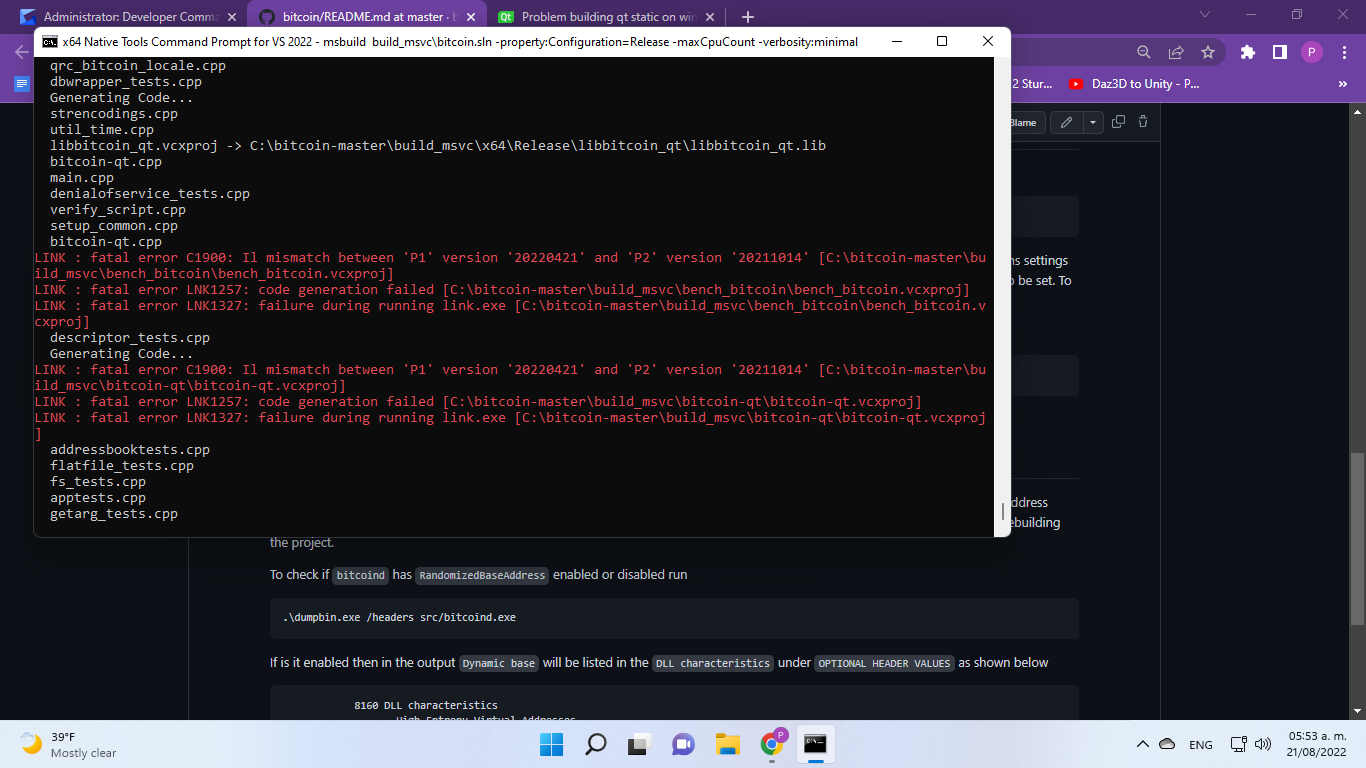
    image i used the x64 native command prompt to build qt this time after clean all and start fresh, then used same for build proyect but this show up, is there any windows stable version of bitcoin to test in visual studio? thanks.
  15. PabloMonfort commented at 9:11 AM on August 21, 2022: none

    can we reopen it?

    Trying to build for an arch we don't support, isn't an issue with our docs. The developer console output is clear.

    im not understanding well, you mean bitcoin dont support x64? or x86? im very confusing with all this at this point, since vcpkg show ups alot of x86 on all the libs... i think i will take a break after days of try to build the source still didnt was able using visual studio. thanks.

  16. ghost commented at 10:00 AM on August 21, 2022: none

    I am new to this community, and I've been trying to build the bitcoin core without success yet.

    I am a Windows user; I have tried to build the bitcoin core from Powershell and installed vcpkg. I have decided to use VS to build it, I have VS2019 and VS2022 on my computer.

    Visual Studio sucks. Try building Bitcoin Core using WSL: https://github.com/bitcoin/bitcoin/blob/master/doc/build-windows.md#cross-compilation-for-ubuntu-and-windows-subsystem-for-linux

  17. hebasto commented at 11:42 AM on August 21, 2022: member

    I've just finished a clean build using instructions from https://github.com/bitcoin/bitcoin/blob/master/build_msvc/README.md

    Everything works flawlessly. @PabloMonfort

    The fatal error C1900 clearly states that you were using different ToolsVersion when building static Qt and when building Bitcoin Core itself.

    If your have multiple VS installations, make sure you are using the correct version of MSBuild each time.

    Otherwise, re-build the Qt static package from scratch.

    FWIW, my msbuild info:

    >msbuild -version
    Microsoft (R) Build Engine version 17.2.1+52cd2da31 for .NET Framework
    Copyright (C) Microsoft Corporation. All rights reserved.
    
    17.2.1.25201
    
  18. PabloMonfort commented at 8:49 PM on August 21, 2022: none

    I've just finished a clean build using instructions from https://github.com/bitcoin/bitcoin/blob/master/build_msvc/README.md

    Everything works flawlessly.

    @PabloMonfort

    The fatal error C1900 clearly states that you were using different ToolsVersion when building static Qt and when building Bitcoin Core itself.

    If your have multiple VS installations, make sure you are using the correct version of MSBuild each time.

    Otherwise, re-build the Qt static package from scratch.

    FWIW, my msbuild info:

    >msbuild -version
    Microsoft (R) Build Engine version 17.2.1+52cd2da31 for .NET Framework
    Copyright (C) Microsoft Corporation. All rights reserved.
    
    17.2.1.25201
    

    its weird coz... i have used the "Add-Content -Path "vcpkg\triplets\x64-windows-static.cmake" -Value "set(VCPKG_BUILD_TYPE release)" powersell command and i re build qt in the last try with that console native x64... so i dont get why its conflicting after follow all steps... im going back to branch 21 anyways and will try 2019 this time coz my altcoin is based on that branch. i want to know if master had same troubles and at the end i had same troubles with it. but im learning i think now i understand more about how to build this so will keep trying thanks guys.

  19. PabloMonfort commented at 8:52 PM on August 21, 2022: none

    mscv > 17.2.1.25201

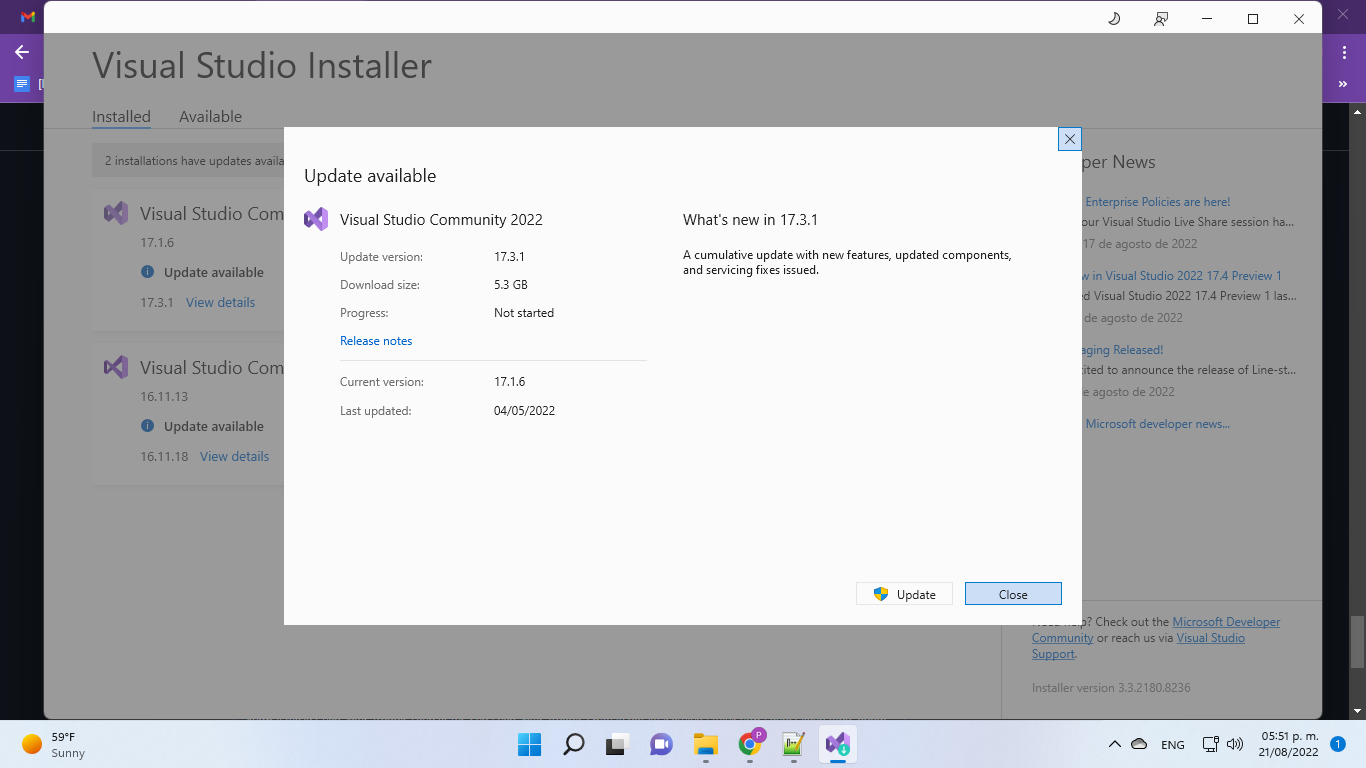
    oh so thats the info i need? coz this is not on the docs. i got this image

    anyways i agree with guy before , visual studio sucks here , dissapointing...

  20. fanquake commented at 9:18 PM on August 21, 2022: member

    im going back to branch 21 anyways and will try 2019 this time coz my altcoin is based on that branch

    This is not an altcoin support forum.

  21. bitcoin locked this on Aug 21, 2023

github-metadata-mirror

This is a metadata mirror of the GitHub repository bitcoin/bitcoin. This site is not affiliated with GitHub. Content is generated from a GitHub metadata backup.
generated: 2026-04-17 06:14 UTC

This site is hosted by @0xB10C
More mirrored repositories can be found on mirror.b10c.me