
Originally, this readme suggests searching for 'turn' to open this dialog but this will not necessarily work on all windows 10 PCs. It's better to use the executable name instead, which is consistent across installations.
Improve "Turn Windows Features On or Off" step #12232
pull MCFX2 wants to merge 1 commits into bitcoin:master from MCFX2:patch-1 changing 1 files +3 −4-
MCFX2 commented at 1:09 PM on January 20, 2018: contributor
-
discosultan commented at 1:57 PM on January 20, 2018: none
In my case, typing "turn" also suggests completely different stuff. However, I feel that using search is more intuitive and easier than using Run.
What if we simply removed the part which says "(type 'turn')"? This would make users to start typing out the whole "Turn Windows features on or off" which would lead to discovering the correct panel.
Another thing I can think of in favor of this PR is the fact that the search approach most probably doesn't work on non-English versions of Windows (haven't tested).
-
MCFX2 commented at 2:05 PM on January 20, 2018: contributor
In my case, typing "turn" also suggests completely different stuff. However, I feel that using search is more intuitive and easier than using Run.
In Windows 10, Search and Run's functions have merged. You can type executable names and commands into search and windows will be able to execute them directly from search (assuming they can be found in PATH).
-
donaloconnor commented at 2:05 PM on January 20, 2018: contributor
Edit: Changed to ACK.
NACKAgree with @discosultan. There's also a confusion risk: "Optional Features" is not the same as OptionalFeatures.exe. I rather avoid calling executable names directly because this is undocumented by MS (AFAIK). Going via the start menu/control panel is Windows's documented ways.
We could add the additional step of going to control panel. From there you can search for "Windows features" to get to the dialog.
Cheers, Donal
-
-
donaloconnor commented at 2:18 PM on January 20, 2018: contributor
Actually, MS documents many of the control panel item's executable names here
Ah thank you I'm wrong. So they do. I must admit when I typed "Optional" and saw "Optional Features" appear, I entered that thinking it was the OptionalFeatures.exe executable. Bad assumption. I'm worried others will get caught on this too.
I'll let it up others to decide anyway :-) Cheers.
Donal
-
in doc/build-windows.md:36 in 5ab0281057 outdated
  32 | @@ -33,8 +33,7 @@ Windows](https://msdn.microsoft.com/en-us/commandline/wsl/install_guide).
  33 |  Full instructions to install WSL are available on the above link.
  34 |  To install WSL on Windows 10 with Fall Creators Update installed (version >= 16215.0) do the following:
  35 |
  36 | -1. Enable the Windows Subsystem for Linux feature
  37 | -  * From Start, search for "Turn Windows features on or off" (type 'turn')
  38 | +1. Enable the Windows Subsystem for Linux feature (Run OptionalFeatures.exe)
promag commented at 3:42 PM on January 20, 2018:Suggestion:
1. Enable the Windows Subsystem for Linux feature
  * Open Windows Features dialog (run `OptionalFeatures.exe`)
  * Select Windows Subsystem for Linux
  ...
promag commented at 3:43 PM on January 20, 2018: memberTested ACK.
Edit: IMO this documentation targets developers which I believe prefer running a command.
donaloconnor commented at 5:08 PM on January 20, 2018: contributorutACK from me now with the valid pointers mentioned above.
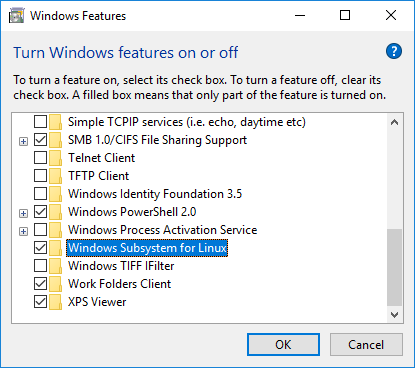
MCFX2 commented at 6:57 PM on January 20, 2018: contributorTook @promag 's suggestion and reworded slightly. At this point I'd consider opening the features dialog to be a step in enabling the feature, so opening the dialog is better with its own line instead of being an aside in the title of the step.
in doc/build-windows.md:38 in fd26c33cd4 outdated
  37 | -  * Select Windows Subsystem for Linux
  38 | -  * Click OK
  39 | -  * Restart if necessary
  40 | +1. Enable the Windows Subsystem for Linux feature
  41 | +  * Open the Windows Features dialog (`OptionalFeatures.exe`)
  42 | +  * Enable 'Windows Susbsystem for Linux (Beta)'
donaloconnor commented at 8:40 PM on January 20, 2018:Just FYI, it's out of beta now :)
promag commented at 9:05 PM on January 20, 2018:Ah yes that's true! Did that yesterday 😄
fanquake added the label Docs on Jan 20, 2018fanquake added the label Windows on Jan 20, 2018MCFX2 commented at 3:19 AM on January 21, 2018: contributorI'm running a slightly out-of-date version of windows (all the more reason to keep things as canonical as possible) which is why the (beta) tag is there for me.
That said, an unnecessary '(beta)' is probably more confusing than an omitted one, so I took your suggestion and removed it.
donaloconnor commented at 12:26 PM on January 21, 2018: contributorACK
fanquake commented at 6:59 AM on January 22, 2018: memberconceptACK
Please squash your commits and use a commit message like "[docs] Rewrite "Windows Subsystem for Linux" step."
meshcollider commented at 1:15 PM on January 22, 2018: contributorConcept ACK, although I'd suggest keeping the name "Turn Windows features on or off" included in a note just for clarity of what the program actually does, as it may be more familiar to some users.
laanwj commented at 3:26 PM on February 8, 2018: memberPlease squash your commits and use a commit message like "[docs] Rewrite "Windows Subsystem for Linux" step."
Agree. If you're unsure how to squash commits, see: https://github.com/bitcoin/bitcoin/blob/master/CONTRIBUTING.md#squashing-commits
Improve "Turn Windows Features On or Off" step 9b6454c52aMarcoFalke force-pushed on Feb 10, 2018MarcoFalke commented at 7:18 PM on February 10, 2018: memberSquashed d9140968d1 ... 9b6454c52a
fanquake commented at 11:12 AM on February 14, 2018: memberutACK 9b6454c
promag commented at 11:27 AM on February 14, 2018: memberutACK 9b6454c.
laanwj merged this on Feb 14, 2018laanwj closed this on Feb 14, 2018laanwj referenced this in commit fdc2188da2 on Feb 14, 2018in doc/build-windows.md:38 in 9b6454c52a
  33 | @@ -34,10 +34,9 @@ Full instructions to install WSL are available on the above link.
  34 |  To install WSL on Windows 10 with Fall Creators Update installed (version >= 16215.0) do the following:
  35 |
  36 |  1. Enable the Windows Subsystem for Linux feature
  37 | -  * From Start, search for "Turn Windows features on or off" (type 'turn')
  38 | -  * Select Windows Subsystem for Linux
  39 | -  * Click OK
  40 | -  * Restart if necessary
  41 | +  * Open the Windows Features dialog (`OptionalFeatures.exe`)
  42 | +  * Enable 'Windows Susbsystem for Linux'
discosultan commented at 12:14 PM on February 14, 2018:typo
susbsystemMCFX2 deleted the branch on Jul 1, 2018attilaaf referenced this in commit c075107209 on May 25, 2019bitcoin locked this on Sep 8, 2021





github-metadata-mirror
This is a metadata mirror of the GitHub repository bitcoin/bitcoin. This site is not affiliated with GitHub. Content is generated from a GitHub metadata backup.
generated: 2026-10-20 03:56 UTC
This is a metadata mirror of the GitHub repository bitcoin/bitcoin. This site is not affiliated with GitHub. Content is generated from a GitHub metadata backup.
generated: 2026-10-20 03:56 UTC
This site is hosted by @0xB10C
More mirrored repositories can be found on mirror.b10c.me
More mirrored repositories can be found on mirror.b10c.me