
Adds an icon for uninstall.exe
Deletes some registry values that were otherwise left in the windows registry after uninstall
Deletes some code (deleting registry values) which was unnecessary
build: Improve Windows uninstaller #16769
pull GChuf wants to merge 2 commits into bitcoin:master from GChuf:uninstall.exe changing 2 files +1 −4-
GChuf commented at 12:01 PM on August 31, 2019: contributor
- fanquake added the label Build system on Aug 31, 2019
- fanquake added the label Windows on Aug 31, 2019
-
GChuf commented at 12:07 PM on August 31, 2019: contributor
We talked about the uninstall.exe icon here: #16760
The uninstall.exe icon looks like it's from 2010 (horrible) and the previous PR didn't really change that - it was more of a quick fix, but only for newer versions of Windows (maybe only Windows 10 and 8). Adding an extra black bitcoin icon or not is to be decided - personally I'd like to include it, but if not, we could simply assign the orange bitcoin logo to the uninstall.exe as well.
Current uninstall.exe icon / New uninstall icon:


The extra 2 lines in setup.nsi.in delete the remaining registry values after the uninstall. See below the registry values in question.EDIT: Decided not to delete HKCU registry key.HKCU "SOFTWARE\Bitcoin" (Actually SOFTWARE\Bitcoin\Bitcoin-Qt)
HKLM "SOFTWARE\Bitcoin Core (@WINDOWS_BITS@-bit)"
- fanquake renamed this:
Update uninstall.exe file
build: Update Windows uninstaller
on Aug 31, 2019 -
fanquake commented at 1:20 PM on August 31, 2019: member
You can split this into two commits, each with a more descriptive commit message. i.e One for the registry modifications, with an explanation of the values being removed, and one for updating the uninstaller icon.
-
-
sipsorcery commented at 4:49 PM on September 4, 2019: member
@GChuf you are missing a double quote:
DeleteRegKey HKLM "SOFTWARE\Bitcoin Core (@WINDOWS_BITS@-bit) -
sipsorcery commented at 5:33 PM on September 4, 2019: member
@GChuf the registry keys on my machine under HKCU and HKLM are both
Bitcoin Core (64-bit). Is there any reason you've deleted them with different names? How do they appear on your machine? -
GChuf commented at 9:48 AM on September 5, 2019: contributor
@sipsorcery nice catch on double quotes, thank you.
Which windows version are you using? Also, which bitcoin version? Can you post some registry screenshots?
Keys on my Win10 (1709) and my Windows 7 (I just tested) appear just how I've set to delete them.
This is from my Win7 machine after uninstall:
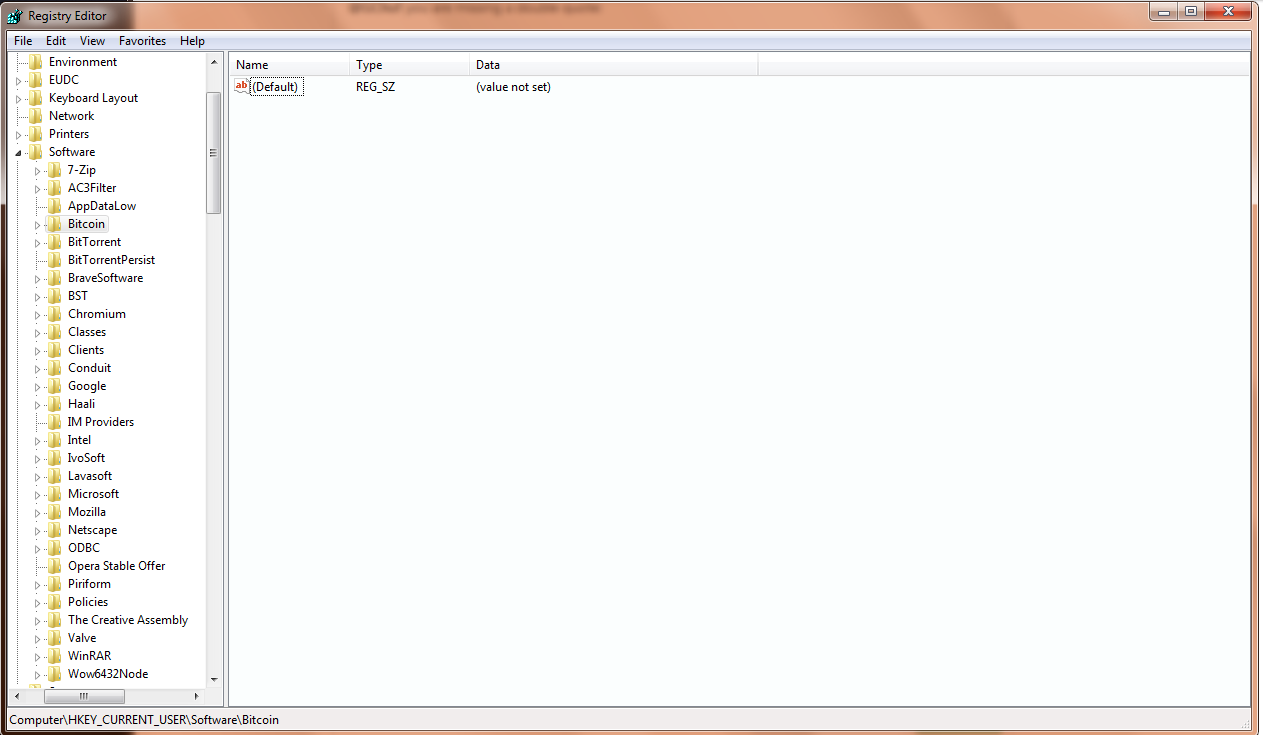
In any case, we can simply add a line to delete
HKCU SOFTWARE\Bitcoin Core (@WINDOWS_BITS@-bit)as well. -
sipsorcery commented at 6:33 PM on September 5, 2019: member
@GChuf I think we should only delete registry keys in the uninstall script that are explicitly set in the install script. If there is somewhere in the Bitcoin app that is setting an additional registry key then IMHO we should add it to the install script.
It seems a bit dangerous to simply delete keys that use the word Bitcoin. There are some other notable products that may have very similar names.
-
GChuf commented at 7:01 PM on September 5, 2019: contributor
Well the registry keys deleted don't just contain the word "bitcoin", they're exactly specified. If there is no key named
Bitcoin Core (64-bit)underHKLM\SOFTWARE, nothing gets deleted.Other products would be wise to avoid naming registry keys (or anything else) exactly
Bitcoin Coreanyway.The fact is that the installer generates these keys and does not delete them, unlike other keys.
Also, you haven't answered my question earlier - what windows version are you using, and what bitcoin version?
-
sipsorcery commented at 7:38 PM on September 5, 2019: member
Windows 10 Pro Insider Preview Build 18956.rs_prerelease.190803-1414. Bitcoin version was built from master with your patch included.
Well the registry keys deleted don't just contain the word "bitcoin", they're exactly specified. If there is no key named Bitcoin Core (64-bit) under HKLM\SOFTWARE, nothing gets deleted.
This delete command from your PR is just "Bitcoin".
DeleteRegKey HKCU "SOFTWARE\Bitcoin"With some more testing I've found that the
HKCU\SOFTWARE\Bitcoinis where some user specific settings are stored, seems to be mainly GUI and default settings. It's debatable whether this should be cleaned up when the app is uninstalled however that's outweighed by the fact that it's existing behaviour that users will certainly be depending on. IMHO this key needs to stay as is.The other delete key in the PR wasn't needed in my testing:
DeleteRegKey HKLM "SOFTWARE\Bitcoin Core (@WINDOWS_BITS@-bit)The existing installer (bitcoin-0.18.1-win64-setup.exe from https://bitcoin.org/en/download) already deletes that key as a result of:
DeleteRegKey /IfEmpty HKCU "${REGKEY}" -
GChuf commented at 8:28 PM on September 5, 2019: contributor
Whatever is specified, that exact thing will be deleted. Be it "Bitcoin" or "Bitcoin Core (64-bit)".
In the case of
DeleteRegKey HKCU "SOFTWARE\Bitcoin", only one key will ever be deleted. If a key with the name of "Bitcoin XXXX" existed there, it would be left untouched.I have to agree on leaving
HKCU\SOFTWARE\Bitcoinas is. User settings are indeed there. (does this mean you haveHKCU\SOFTWARE\Bitcoinand notHKCU\SOFTWARE\Bitcoin Core (64-bit)on your computer as well?)As for
DeleteRegKey HKLM "SOFTWARE\Bitcoin Core (@WINDOWS_BITS@-bit: I've tested it again with 0.18.1 uninstaller, in my case it stays there. Deleting a user specific settings (HKCU) should never delete machine-specific settings (HKLM). User settings override any machine settings as far as I know, but that's about it - they should not be linked in a way that if a user uninstalls a program, the machine settings should get removed.I also tested it manually with deleting registry keys in HKCU - HKLM was left untouched.
-
GChuf commented at 10:37 AM on September 6, 2019: contributor
Updated
-
sipsorcery commented at 10:04 AM on September 7, 2019: member
Next suggestion now is to follow the existing convention in the file for specifying the keys to delete.
Instead of:
DeleteRegKey HKLM "SOFTWARE\Bitcoin Core (@WINDOWS_BITS@-bit)"it should be:
DeleteRegKey /IfEmpty HKLM "${REGKEY}"That way if the name of the installer package ever changes it will automatically get applied without needing the additional step of also changing the on this step.
I think it's also worth adding /IfEmpty as a precaution. On my machine there are no subkeys added under
HKLM\SOFTWARE\Bitcoin Core (64-bit). -
GChuf commented at 12:25 PM on September 7, 2019: contributor
Agreed. No subkeys on my machine as well. Will change to
DeleteRegKey /IfEmpty HKLM "${REGKEY}".Do you think we could also remove these entries which delete values?
DeleteRegValue HKCU "${REGKEY}" StartMenuGroup
DeleteRegValue HKCU "${REGKEY}" Path
These values should automatically be deleted when deleting keys anyway:
DeleteRegKey /IfEmpty HKCU "${REGKEY}\Components"DeleteRegKey /IfEmpty HKCU "${REGKEY}" -
sipsorcery commented at 12:34 PM on September 7, 2019: member
Do you think we could also remove these entries which delete values?
DeleteRegValue HKCU "${REGKEY}" StartMenuGroup
DeleteRegValue HKCU "${REGKEY}" Path
No they should be left as is. The original author has decided that it's safe to explicitly delete those sub keys no matter what they contain. If the commands are removed and the keys do exist then the command below will fail due to the
IfEmptyflag.DeleteRegKey /IfEmpty HKCU "${REGKEY}" -
GChuf commented at 1:01 PM on September 7, 2019: contributor
It is true that the command will fail if there are subkeys. However these are values (!) being deleted, not subkeys. Therefore, deleting values and keys afterwards is doing the same thing twice.
-
GChuf commented at 11:44 AM on September 11, 2019: contributor
@sipsorcery @fanquake I was able to build bitcoin-qt.exe following this guide but I wasn't able to build the windows installer. I'd like to build the installer (and uninstaller) to test a few things in the registry - can you point me out to some resources? I'm pretty sure we can remove the values being deleted and just delete the registry key, but I want to test it myself.
-
sipsorcery commented at 12:03 PM on September 11, 2019: member
@GChuf I can confirm the Windows installer builds correctly on an Ubuntu 18.04 VM using those instructions. What OS were you using?
-
GChuf commented at 12:35 PM on September 12, 2019: contributor
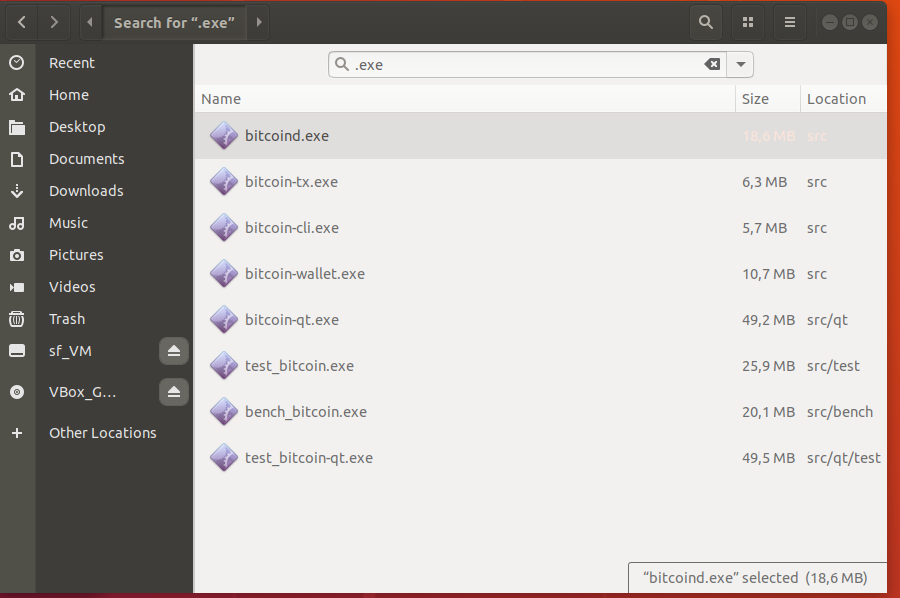
@sipsorcery using Ubuntu 18.04 VM as well. I get some .exe files when the process is finished, but bitcoin-qt.exe appears to be portable install.
-
sipsorcery commented at 12:47 PM on September 12, 2019: member
The bitcoin-qt.exe isn't an installer. That's solely the GUI application. It's big because it's a static build and pulls in the all Qt dependencies.
Did you definitely do the
sudo apt install nsisandmake deploysteps? If so the build should have produced the installer executable. -
GChuf commented at 9:02 PM on September 12, 2019: contributor
@sipsorcery thank you. I was missing
make deploy, I only didmakeand thought I might have done something wrong - obviously I should have looked at the instructions again.I've made sure that deleting registry values is useless since registry keys are deleted anyway. I was not able to delete the key under HKLM - not sure why. Deleting it manually in regedit works.
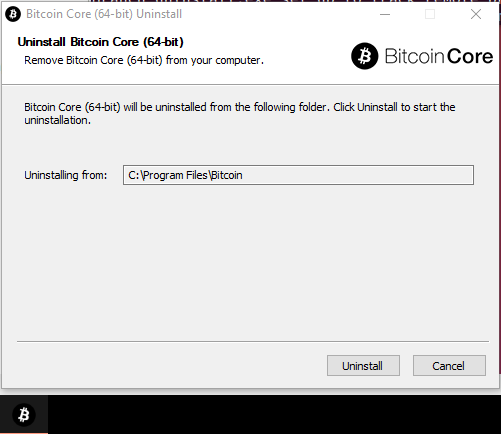
And this is how the uninstaller looks with the new icon:
-
build: update uninstaller icon f09e085cde
-
a5cd73ce51
build: remove unnecessary uninstaller code
Removes 3 lines where deleting registry values is not needed
(they are deleted when the corresponding registry keys are deleted)
Note: /IfEmpty is looking for subkeys, not values.
-
sipsorcery commented at 10:15 PM on September 13, 2019: member
The icon change looks ok to me but removing the delete of the registry keys isn't justified. Those instructions may not have an effect on yours or my Win10 systems but maybe they do on Win7 or Vista, XP etc.
General rule of thumb with Bitcoin Core changes is that the impacts need to be very well understood or they shouldn't be applied. Not saying it would have to go as far back as Windows 3.1 but at least the last 3 or 4 versions.
IMHO the main benefit of this PR is the better looking icon. Why not leave the change at that?
-
GChuf commented at 11:57 AM on September 14, 2019: contributor
Let's clear some things out.
Windows 2000 and Windows XP use the same registry structure as Windows 10 (version 5.00). Of course Windows 7/8/Vista also use v5.00. More info here.
Registry keys are like folders, while registry values are like files within folders. Don't mix them. NSIS Bitcoin uninstaller script right now removes values first and keys later. This is unnecessary. The original author of the script must have done this under the pretense that registry keys have to be completely empty to be deleted when using the
/IfEmptyflag. This is not true. As described in the link you have sent before, /IfEmpty flag looks for subkeys, not values. Since those registry keys in question don't have any subkeys, the linesDeleteRegKey /IfEmptywill delete the key with all its values. If a user should create a subkey him/herself, the key would not be deleted since it would not be "empty".
-
fanquake commented at 9:28 AM on September 16, 2019: member
The icon change looks ok to me
I agree. This PR could be just that change.
I don't have experience working with the Windows registry or unisntall process, however I think we're getting bogged down into a change where, if we leave everything as is, in the worse case a registry key that doesn't exist doesn't get deleted? Will defer to others that have an opinion.
-
in share/setup.nsi.in:24 in a5cd73ce51
  20 | @@ -21,7 +21,7 @@ SetCompressor /SOLID lzma
  21 |  !define MUI_STARTMENUPAGE_DEFAULTFOLDER "@PACKAGE_NAME@"
  22 |  !define MUI_FINISHPAGE_RUN "$WINDIR\explorer.exe"
  23 |  !define MUI_FINISHPAGE_RUN_PARAMETERS $INSTDIR\@BITCOIN_GUI_NAME@@EXEEXT@
  24 | -!define MUI_UNICON "${NSISDIR}\Contrib\Graphics\Icons\modern-uninstall.ico"
  25 | +!define MUI_UNICON "@abs_top_srcdir@/share/pixmaps/bitcoin-black.ico"
MarcoFalke commented at 1:50 PM on September 16, 2019:Where is this file from and how was it created?
GChuf commented at 2:14 PM on September 16, 2019:This icon file was created by me with the help of Adobe Photoshop and another program for making .ico files on Windows (Axialis IconWorkshop). The original file I used was this: https://raw.githubusercontent.com/bitcoin/bitcoin/0.18/src/qt/res/icons/about.png
GChuf commented at 2:30 PM on September 16, 2019: contributorIf we leave everything as is, in the worse case a registry key that doesn't exist doesn't get deleted?
I'm not sure how you got here. The result will be the same if we make the change or not. I simply deleted unnecessary lines and made the uninstall process cleaner. So, this is an optimization.
I believe I explained everything in my previous comment (and commit message), but to hopefully make it clearer: If registry keys (which contain values) are deleted, those values are automatically deleted as well.
I've worked with windows registry on various occasions and I've tested the uninstaller after these changes. If there are any other people you know about who worked with windows and the registry extensively, you can mention them here.
sipsorcery commented at 2:48 PM on September 16, 2019: memberIf registry keys (which contain values) are deleted, those values are automatically deleted as well.
Except if the
/IfEmptyflag is specified.The existing logic that's relevant here seems pretty clear to me:
Where the install is on Windows 64bit:
- Delete value HKCU\Bitcoin Core (64-bit)\Components | Main
- Delete value HKCU\Bitcoin Core (64-bit) | StartMenuGroup
- Delete value HKCU\Bitcoin Core (64-bit) | Path
- Delete key HKCU\Bitcoin Core (64-bit)\Components ONLY if empty
- Delete key HKCU\Bitcoin Core (64-bit) ONLY if empty
This PR makes changes to that logic and even though the changes are very trivial I can't see any justification.
NACK from me.
GChuf commented at 3:04 PM on September 16, 2019: contributor@sipsorcery I've explained 2 times already that /IfEmpty flag looks for subkeys not values. I don't know what else to say. Read the NSIS link again.
sipsorcery commented at 3:13 PM on September 16, 2019: member@sipsorcery I've explained 2 times already that /IfEmpty flag looks for subkeys not values. I don't know what else to say. Read the NSIS link again.
Yes but what about the case where there are subkeys that exist under
HKCU\Bitcoin Core (64-bit). In that case it's still desirable that the values get removed but not the parentHKCU\Bitcoin Core (64-bit)key.GChuf commented at 6:58 PM on September 16, 2019: contributorYes but what about the case where there are subkeys that exist under
HKCU\Bitcoin Core (64-bit). In that case it's still desirable that the values get removed but not the parentHKCU\Bitcoin Core (64-bit)key.I don't understand where you're getting at.
First, do we agree that deleting registry values specifically is not needed in the script? Have we established that
/IfEmptycommand is not looking at values?Second, what do you mean by desirable? The
HKCU\Software\Bitcoin Core (64-bit)key does not contain any "valuable" information (the user settings are all stored atHKCU\Software\Bitcoin) and was always being deleted - my commit does not change anything for that key, so I don't see any connection here.GChuf commented at 8:02 PM on September 20, 2019: contributor@NicolasDorier would you be willing to take another look? In particular, the registry values? We've already talked about the icon in the previous PR if you remember.
luke-jr commented at 9:33 PM on September 20, 2019: memberUh, won't this change the Start Menu icon for the uninstaller? People looking through their Start Menu to run Bitcoin don't want to get the icons confused IMO. Having the icon itself reflect uninstallation is therefore important.
GChuf commented at 2:31 PM on September 26, 2019: contributor@luke-jr yes, it will change the start menu icon, but since for most users the first icon will be
bitcoin-qtanyway, I don't think it will be an issue. The bitcoin testnet icon is also exactly the same except the green colour and it doesn't seem to cause any problems. laanwj commented at 11:14 AM on September 30, 2019: member
Having the icon itself reflect uninstallation is therefore important.
This is a very good point why the icon for uninstallation needs to be qualitatively different and not just, say, the bitcoin icon in a different color.
laanwj renamed this:build: Update Windows uninstaller
build: Improve Windows uninstaller
on Oct 2, 2019laanwj commented at 10:23 AM on November 2, 2019: memberClosing this as it seems controversial.
laanwj closed this on Nov 2, 2019bitcoin locked this on Dec 16, 2021




github-metadata-mirror
This is a metadata mirror of the GitHub repository bitcoin/bitcoin. This site is not affiliated with GitHub. Content is generated from a GitHub metadata backup.
generated: 2026-10-26 15:55 UTC
This is a metadata mirror of the GitHub repository bitcoin/bitcoin. This site is not affiliated with GitHub. Content is generated from a GitHub metadata backup.
generated: 2026-10-26 15:55 UTC
This site is hosted by @0xB10C
More mirrored repositories can be found on mirror.b10c.me
More mirrored repositories can be found on mirror.b10c.me