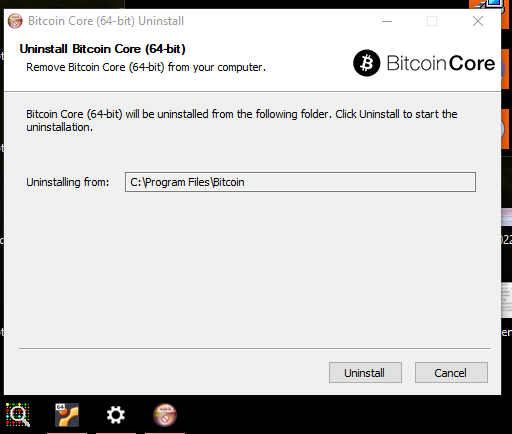
Change uninstall icon in Windows by changing a registry value. Original uninstall.exe icon remains the same Reason: almost no other modern program uses that uninstall icon in Windows.
before:
 after:


Change uninstall icon in Windows by changing a registry value. Original uninstall.exe icon remains the same Reason: almost no other modern program uses that uninstall icon in Windows.
before:
after:

utACK 635e9154da223ca760713d7b3b66c0a9321d1277
As I said, the original uninstall icon remains the same. Not sure if we should change that as well - maybe with bitcoin logo all in black?
I decided to add a black icon, sizes 64px - 16px, RGBA and RGB. Reason: might also come in handy in the future for something else, and the uninstall icon display will not be dependent on registry values.


Actually I think you could revert to 635e9154da223ca760713d7b3b66c0a9321d1277, it just fixes the icon. Let's discuss the black icon elsewhere?
ACK 635e9154da223ca760713d7b3b66c0a9321d1277.
  20 | @@ -21,7 +21,7 @@ SetCompressor /SOLID lzma
  21 |  !define MUI_STARTMENUPAGE_DEFAULTFOLDER "@PACKAGE_NAME@"
  22 |  !define MUI_FINISHPAGE_RUN "$WINDIR\explorer.exe"
  23 |  !define MUI_FINISHPAGE_RUN_PARAMETERS $INSTDIR\@BITCOIN_GUI_NAME@@EXEEXT@
  24 | -!define MUI_UNICON "${NSISDIR}\Contrib\Graphics\Icons\modern-uninstall.ico"
  25 | +!define MUI_UNICON "@abs_top_srcdir@/share/pixmaps/bitcoin-black.ico"

should be \ not /
I don't think so. It was backslashes because that was NSIS directory which I think only appears when installing on Windows.
The pixmaps/icons are in the source folder. Take a look at how bitcoin-qt.exe icon is defined:
!define MUI_ICON "@abs_top_srcdir@/share/pixmaps/bitcoin.ico"

ACK 635e915

ACK 635e9154da223ca760713d7b3b66c0a9321d1277

ACK 635e9154da223ca760713d7b3b66c0a9321d1277 - Tested building and installing using WSL on Windows 10.
v0.18.1:

This PR:

